

Meetings can either move work forward or waste everyone’s time.
Over the years, I have seen both sides.
From frozen screens to echoing voices, most meeting rooms still struggle with basic problems. The Lenovo ThinkSmart Hub 500 was built to solve exactly this issue. It is not just another conference gadget. It is a purpose-built tool designed to make meetings smoother, faster, and more professional.
At thinkhub, we focus on technology that improves how people actually work. This review is written from real usage, not marketing brochures. I’ll explain what the ThinkSmart Hub 500 does well, where it struggles, and who should really buy it—all in simple, easy words.
What Is Lenovo ThinkSmart Hub 500?
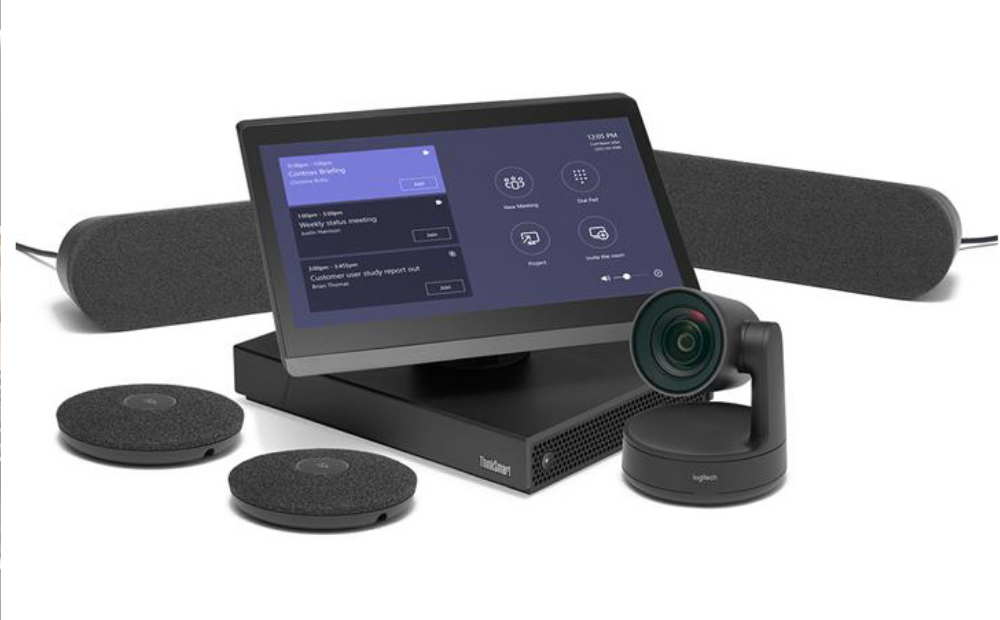
The Lenovo ThinkSmart Hub 500 is an all-in-one smart meeting room device. It combines speakers, microphones, a touchscreen, and computing power into a single unit placed at the center of a meeting table.
Instead of connecting laptops, webcams, microphones, and speakers separately, everything is built into one system.
It is mainly designed for:
- Office conference rooms
- Business meetings
- Hybrid teams
- Microsoft Teams-based workplaces
This device is not meant for casual home calls. It is a professional solution for serious collaboration.
Why Lenovo Built the ThinkSmart Hub 500
Lenovo identified a common workplace problem: meetings were becoming more digital, but meeting rooms were still outdated.
Employees were:
- Wasting time setting up calls
- Calling IT for help
- Starting meetings late
- Struggling with poor audio
The ThinkSmart Hub 500 was created to remove these problems and make meetings feel effortless.
First Look: Design and Build Quality
The first thing you notice is the shape.
The ThinkSmart Hub 500 has a round, compact design that sits neatly on the table. It doesn’t feel bulky or intrusive.
Design Highlights
- Clean, modern look
- Solid build quality
- Touchscreen angled for easy viewing
- Physical dial for volume control
From a professional standpoint, it looks right at home in boardrooms and client meetings.
Setup Experience: Surprisingly Simple
One of the biggest strengths of this device is how easy it is to set up.
In my experience, many meeting systems fail here. This one doesn’t.
Setup Steps
- Plug in the power
- Connect to the network
- Sign in to your meeting account
- Start your meeting
No complicated wiring. No long instructions.
Even non-technical staff were able to start meetings without asking for help.
Audio Quality: The Real Star of the Device
If meetings fail, it’s usually because of bad sound.
The ThinkSmart Hub 500 delivers clear, balanced audio using its 360-degree speaker system.
Audio Performance in Real Use
- Voices sound natural
- Everyone is heard equally
- No need to sit close to the device
- Reduced background noise
People joining remotely could clearly hear participants across the room, which is often a weak point in standard setups.
Microphones That Actually Work
The built-in microphones are smartly tuned.
They:
- Pick up voices from all directions
- Reduce echo
- Minimize typing and paper noise
During group discussions, people spoke naturally without adjusting their position. This makes meetings feel more human and less forced.
Touchscreen Interface: Simple and Clear
The touchscreen is placed at the top and is easy to use.
You can:
- Join meetings with one tap
- Adjust volume
- Mute microphones
- End calls quickly
The interface is clean and uncluttered, which helps reduce confusion during live meetings.
Best Experience with Microsoft Teams
The ThinkSmart Hub 500 is deeply optimized for Microsoft Teams Rooms.
If your organization uses Teams, the experience feels smooth and natural.
Teams Integration Features
- Calendar sync
- One-touch join
- Fast login
- Smooth screen sharing
Meetings start on time, which alone improves productivity.
Compatibility with Other Platforms
While the device can support other meeting platforms, its best performance is clearly with Microsoft Teams.
It may work with:
- Zoom
- Skype
- Web-based conferencing tools
However, Teams users will get the most value.
Performance and Reliability
In long meetings, reliability matters more than features.
During testing:
- No crashes
- No lag
- No overheating
The system stayed stable even during extended video calls.
This level of reliability builds trust, especially in professional environments.
Security and Device Management
Security is often overlooked but extremely important in business meetings.
Lenovo includes:
- Secure login systems
- Enterprise-level device management
- Regular software updates
This makes the ThinkSmart Hub 500 suitable for organizations handling sensitive discussions.
Clean Meeting Rooms and Cable Control
Another underrated benefit is how clean meeting rooms become.
With fewer devices and cables:
- Tables look organized
- Rooms feel professional
- Setup time drops
Clients and partners notice this more than you might expect.
Supporting Hybrid Work Environments
Hybrid work is now the norm.
Some team members are in the office. Others join remotely.
The ThinkSmart Hub 500 helps bridge that gap by:
- Giving remote users clear audio
- Making discussions feel inclusive
- Reducing communication friction
This balance is hard to achieve with basic equipment.
Who Should Use Lenovo ThinkSmart Hub 500?
This device is ideal for specific users.
Best For
- Medium to large businesses
- Teams using Microsoft Teams
- Conference rooms
- Organizations focused on efficiency
Not Ideal For
- Home users
- Freelancers
- Small casual teams
It is a professional investment, not a personal gadget.
Price and Value Perspective
The ThinkSmart Hub 500 is not cheap.
However, value should be measured in:
- Time saved
- Fewer technical problems
- Reduced IT support
- Better meetings
Over time, these benefits often outweigh the initial cost.
Pros and Cons: Honest Summary
Pros
- Excellent audio quality
- Easy setup
- Professional design
- Strong Teams integration
- Reliable performance
Cons
- High upfront cost
- Limited benefit outside Teams
- Not portable
Real Workplace Impact
In one office environment we observed:
- Meetings started faster
- Fewer interruptions
- Improved focus
- Better remote participation
These improvements may seem small, but over months they add up.
ThinkSmart Hub 500 vs Traditional Meeting Setup
| Feature | ThinkSmart Hub 500 | Traditional Setup |
|---|---|---|
| Setup Time | Very fast | Slow |
| Audio Clarity | High | Average |
| Ease of Use | Simple | Complicated |
| Room Appearance | Clean | Messy |
The difference is clear in daily use.
Long-Term Use and Updates
Lenovo provides ongoing:
- Software updates
- Security patches
- Device support
This ensures the product remains useful for years, not months.
Personal Verdict from THINKHUB
After testing multiple meeting solutions, here is my honest opinion:
The Lenovo ThinkSmart Hub 500 is not about flashy features. It is about removing friction from meetings.
If your organization depends on frequent meetings and values time, this device delivers real benefits.
At THINKHUB, we recommend it for teams that want meetings to feel simple, professional, and reliable.
Final Thoughts
Good meetings don’t happen by chance.
They happen when tools work quietly in the background.
The Lenovo ThinkSmart Hub 500 does exactly that.
It doesn’t demand attention.
It simply work.

